Qwen3-TTS on an R9700 vs an RTX PRO 6000 Max-Q: What I Measured
Qwen3-TTS 1.7B through vLLM-Omni on 2 homelab GPUs: the RTX PRO 6000 Max-Q finished WAVs 3 to 4× faster, and 1 vLLM upgrade cut R9700 times by 34 to 45%.
With both servers on vLLM 0.32, my RTX PRO 6000 Max-Q produced complete Qwen3-TTS audio 3 to 4× faster than my Radeon AI PRO R9700. A 34-word reply took 1.95 seconds on NVIDIA and 7.80 seconds on AMD.
The R9700 got much better along the way. One vLLM upgrade cut its times by 34 to 45%, and it went from slower than real time to faster. NVIDIA stays the default voice for Chans. The R9700 stays as an option.
This isn't a lab test. The R9700 host was also running speech recognition and the LLM, and I didn't log GPU load. These numbers come from my working setup.
Why I tried it
Chans is a voice agent. The caller speaks, Whisper turns it into text, an LLM writes a reply, and text-to-speech reads it back. I wanted Qwen3-TTS for its preset voices and for instructions like "Speak warmly and clearly."
My first try on the R9700 used Qwen's Python SDK. A short phrase took about 8 seconds, far too slow to hold a conversation. A Gradio app on the NVIDIA box was quicker, but it builds the whole file before you can download it.
So I served the same model with vLLM-Omni on both machines and called its /v1/audio/speech endpoint directly.
The two machines
| AMD | NVIDIA | |
|---|---|---|
| GPU | Radeon AI PRO R9700, 32 GB | RTX PRO 6000 Blackwell Max-Q, 96 GB |
| Software | ROCm | CUDA |
| Reported vLLM | 0.27.1, then 0.32.0 | 0.30.0, then 0.32.0 |
| Also running | Whisper and the conversation LLM | ComfyUI at times; not checked during these rounds |
| Model | Qwen3-TTS-12Hz-1.7B-CustomVoice | Same |
The R9700 host is the same box from my Flash-Next post. The RTX PRO 6000 also costs several times as much.
How I measured it
- 3 replies: short (7 words), medium (16 words) and long (34 words). Same voice (Ryan), language and instruction every time.
- 2 formats: wait for a complete WAV, or stream raw audio as it's generated.
- 4 repeats of each, sent one at a time and alternating between machines.
- 3 rounds on 29 October, upgrading one machine between rounds:
- R9700 on vLLM 0.27.1, RTX PRO 6000 on 0.30.0
- R9700 upgraded to 0.32.0
- RTX PRO 6000 upgraded to 0.32.0
After each round, I also played 3 recorded caller turns through the full Chans pipeline, twice per machine. Only the TTS server changed.
Complete audio: 3 to 4× apart
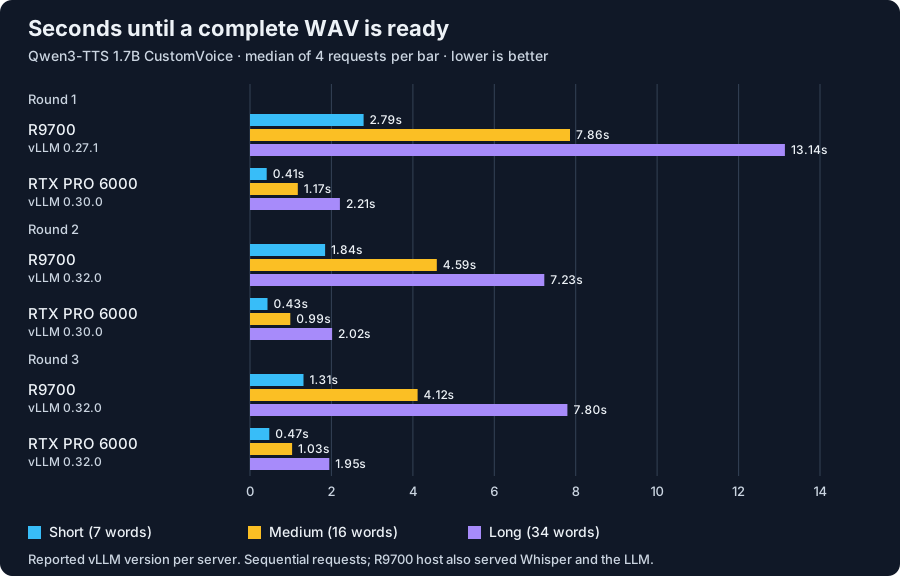
Each bar is the median of 4 requests, measured from sending the request to having a decoded WAV. Lower is better.
In the final round, the RTX PRO 6000 was about 3× faster on the short reply and 4× faster on the longer two. It generated speech about 5× faster than it plays. The R9700 managed about 1.5×.
For a voice agent, short replies matter most. Waiting half a second for a greeting is fine. Waiting 1.3 seconds is noticeable.
One upgrade closed part of the gap
On vLLM 0.27.1, the R9700 generated speech slower than it plays. A streamed reply would have run out of audio mid-sentence.
Upgrading to 0.32.0 cut its times by 34 to 45% and put it ahead of real time on every reply.
Upgrading NVIDIA from 0.30.0 to 0.32.0 changed nothing I could measure. Every reply stayed within 0.07 seconds of the round before.
The R9700 is also less consistent. Nothing changed between rounds 2 and 3, yet its short reply got half a second faster and its long reply half a second slower.
Streaming: the first bytes are silence
Streaming looked amazing at first. The first chunk of audio arrived after 26 ms on NVIDIA and about 0.1 seconds on the R9700.
But that chunk was nearly silent. On NVIDIA, the first clearly audible sound came 0.42 to 0.53 seconds in. I didn't run this check on the R9700.
The number that matters is how soon playback can start without stuttering later:
| Earliest smooth start | Short | Medium | Long |
|---|---|---|---|
| RTX PRO 6000 | 0.32 s | 0.32 s | 0.32 s |
| R9700 | 0.72 s | 0.89 s | 1.52 s |
NVIDIA's start time doesn't grow with length because it generates 5× faster than playback. The R9700 is only about 1.5× faster, so longer replies need a bigger head start.
Chans doesn't play the stream yet. It still waits for the complete WAV, so this is what streaming could save, not what callers hear today.
In a full conversation turn
Here's how long a caller waited for the reply to start, in the final round:
| Median seconds | RTX PRO 6000 | R9700 |
|---|---|---|
| Making sure the caller finished | 0.61 | 0.61 |
| Speech to text | 0.17 | 0.17 |
| LLM's first phrase | 0.24 | 0.24 |
| Text to speech | 0.45 | 1.92 |
| First reply audio ready | 1.45 | 2.92 |
Medians of 6 turns each, so the stages don't add up exactly.
TTS is the only difference between the two columns.
One replay in round 1 is a good reminder to measure the whole turn. The LLM stalled for 45 seconds and the turn took 49. That replay happened to use the R9700 for TTS, but the TTS wasn't to blame. A faster voice can't fix a slow LLM.
What this doesn't show
- The machines weren't idle. The R9700 host also ran Whisper and the LLM. I didn't log GPU load, clocks, power or drivers on either one.
- Same version, maybe not same build. "vLLM 0.32.0" is what each server reported. I didn't check that the vLLM-Omni builds matched.
- No fixed seed, so audio lengths varied a little between requests.
- 4 samples per bar gives a fair median but says little about the worst case. The first NVIDIA WAV in round 3 took 3.6 seconds, and an earlier test had one 32-second request I can't explain. Both are in the data.
- One request at a time. I didn't test multiple callers.
Requests, settings, and benchmark data
The complete-WAV request body:
{
  "model": "qwen3-tts-1.7b-customvoice",
  "input": "Hello. How can I help you today?",
  "voice": "ryan",
  "language": "English",
  "instructions": "Speak warmly and clearly.",
  "response_format": "wav",
  "stream": false
}
The streaming request changes response_format to pcm, sets stream to true and adds "stream_format": "audio". The server returns mono 24 kHz signed 16-bit PCM.
The 3 texts:
- Short:
Hello. How can I help you today? - Medium:
Your appointment is confirmed for Thursday at ten in the morning. Please arrive ten minutes early. - Long:
I can help you book an appointment, change an existing booking, or answer a question about our services. Tell me which option you need, and we will take it one step at a time.
The benchmark client kept one HTTP connection open, with a 60-second timeout and an 8 MB response cap. WAV times include decoding.
To estimate the smooth start, I took each chunk's arrival time minus the length of audio received before it. The largest of those values is the earliest start that never runs out of audio.
Inside Chans, the Qwen adapter sends one stream: false request with a 30-second timeout, checks the WAV and resamples it to 16 kHz.
The benchmark data has per-round medians and maxima for every text, format and machine, plus the full-pipeline stage times.
The RTX PRO 6000 stays the default Chans voice. Next I'll rerun one round with both machines idle, the LLM moved off the R9700 host and GPU state logged. After that, I want Chans to play the stream as it arrives. On NVIDIA that would only save about a tenth of a second. On the R9700, a long reply could start after 1.5 seconds instead of 7.8.